Yazhan Labs software

Chat Cleaner for ChatGPT

Review your ChatGPT conversation list and permanently delete only the chats you select from a portable Windows utility.

Version 1.1.1 Windows 10/11 Portable ZIP

Overview

Clean long chat histories with careful selection

The app loads available ChatGPT chat titles into a searchable checklist so you can choose exactly what to remove.

Manual official login

Sign in directly on the official ChatGPT website inside Microsoft WebView2. Yazhan Labs does not receive your password.

Search and select

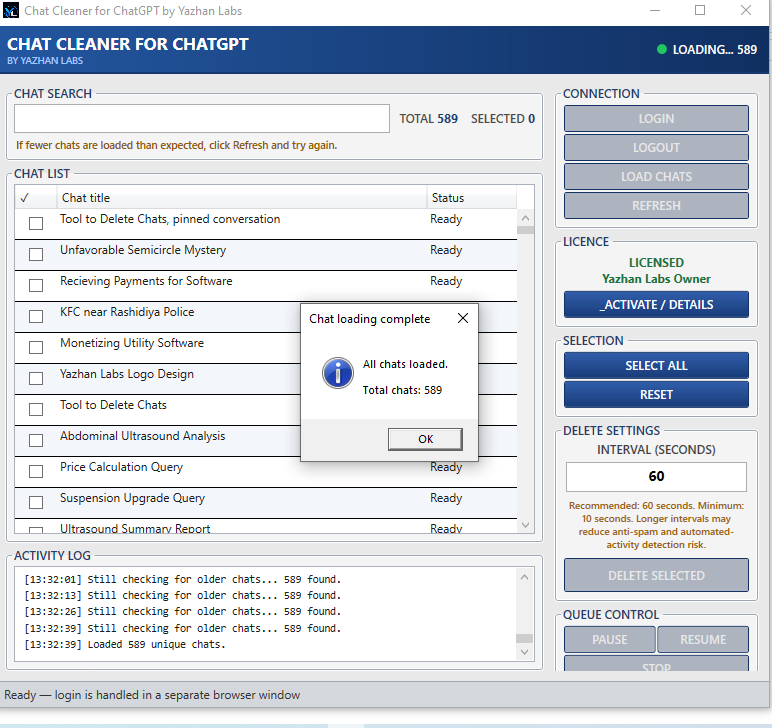
Load chat titles, search the list, select individual chats, use Select All, or reset before deleting.

Controlled deletion

Use pause, resume, stop, refresh and per-chat status while deleting selected chats at a controlled interval.

Screenshots

See the Windows interface

Product interface in version 1.1.1.

Chat Cleaner for ChatGPT chat selection screen Search and select chats
Chat Cleaner for ChatGPT deletion progress screen Deletion progress

Features

Main features

Portable

No installer needed

Extract the ZIP and run the Windows EXE directly.

Local profile

WebView2 login

Login profile stays local to your Windows account through Microsoft WebView2.

Checklist

Selectable chats

Review loaded chat titles in a searchable checklist before any deletion.

Control

Pause and stop

Pause, resume, stop or refresh while monitoring progress in the activity log.

Progress

Per-chat status

Follow the activity log and review the status of each selected conversation.

Privacy

No Yazhan telemetry

The app does not include Yazhan Labs telemetry or advertising trackers.

How it works

Basic steps

  1. Download and extract the customer ZIP.
  2. Run Chat Cleaner for ChatGPT by Yazhan Labs.exe.
  3. Read and accept the first-run disclaimer.
  4. Click Login and sign in manually on the official ChatGPT website.
  5. Click I Am Logged In, then click Load Chats.
  6. Search or select the chats you want to remove.
  7. Use the recommended 60-second interval, then click Delete Selected and confirm.

Deleted chats cannot be restored. Always review selections carefully before confirming.

Safe use

Review every selection before deleting

Chat deletion is permanent. Use the selection list and confirmation step carefully.

Start with a small selection

Test the workflow with one unneeded conversation before processing a larger group.

Check titles carefully

Search and review the checked items before confirming the deletion step.

Use the official download

Download from this page and compare the ZIP checksum before running the app.

Requirements

System requirements

Windows only

64-bit Windows 10 or Windows 11.

Internet connection

Required for ChatGPT login and chat management.

Microsoft WebView2

Most current Windows systems already include it.

ChatGPT account

Use only with an account you are authorised to manage.

Download

Download Chat Cleaner v1.1.1

Download the official customer ZIP for Windows.

SHA-256 checksum for the ZIP:

7CB3517B510285BAF890917C44948F0E4C8F44483E688780FEA1C18952E19ECE

Windows may show a SmartScreen warning because this release is self-signed. Only run the file if it came from this official Yazhan.net page and the checksum matches. Do not disable Windows security protections.

FAQ

Common questions

Does it require installation?

No. Extract the ZIP and run the EXE directly.

Does Yazhan Labs receive my password?

No. Login happens manually on chatgpt.com inside Microsoft WebView2. The app does not ask Yazhan Labs for your password.

Can deleted chats be restored?

No. Chat deletion is permanent, so review every selection before confirming.

What should I check before deleting?

Review the selected titles, start with a small batch and remember that deleted chats cannot be restored.